Capacity Building - Summer Internships Program
How to Create User Profile
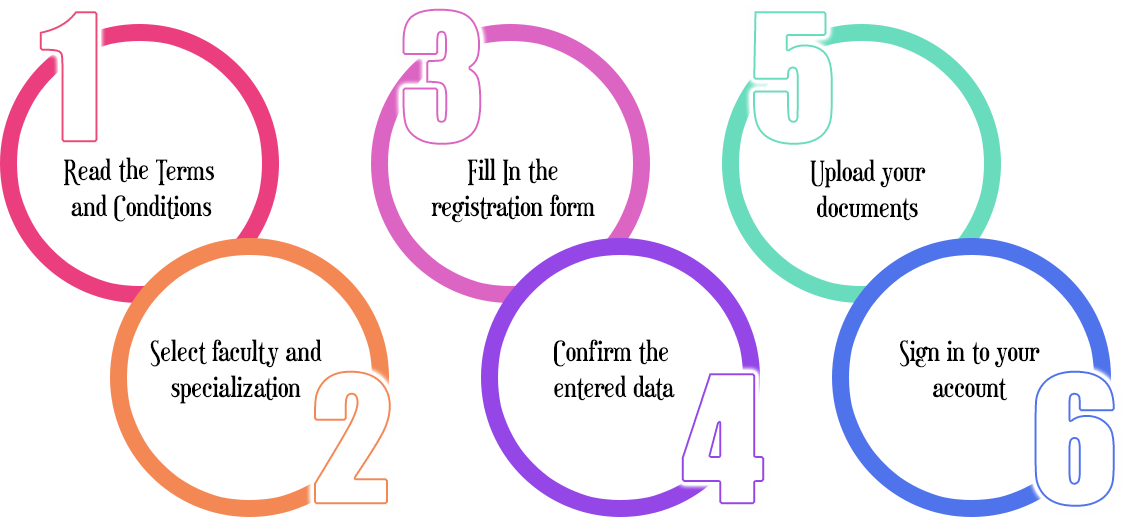
- Create User Account (User Profile)
- Please select your registration type according to your faculty and your specialization.
- Fill in the registration form and press “Register” button to create your account and continue to the confirmation page.
- The “Confirmation Page” displays your registration data that we received, to update your data press “edit”, if your data is correct then press “Confirm” to continue to the “Document Upload” page.
- The “Document Upload” page allows you to upload the required scanned files. (this is an optional step and these documents can be uploaded later).
- Apply for Module/s
- Before applying for a module please sign in to your account; press “sign in” and enter your email and your national id number.
- Go to “My Modules” section and press “apply for modules”.
- Select the required module and press “apply”.
- Using profile page to upload files
- To open the profile page; please go to the sign in page and enter your email and your national id number and press “sign in”.
- The profile page contains some of your personal data, the modules you applied for, your uploaded files, and any previous history with NTI.
- In the “My Modules” section you can “apply for new modules” and you an “download the Pledge”.
- In the “My Uploaded Documents” section you can "upload or replace" your files.